

Most of what goes wrong on the expense side of a CRE budget is not a wrong number. It is a right...

Gemini Notebook answers questions from the documents you give it and points to the passage behind every answer. For CRE teams buried in OMs, rent rolls and market reports, that takes most of the hunting out of the job. Just check which Google account you are signed in with before you upload a rent roll.
Updated October 29, 2026. Google renamed NotebookLM to Gemini Notebook on July 16, 2026. We rewrote this article for the new name, the code-running feature that came with it, and a more precise account of what happens to the documents you upload.
TL;DR
- Gemini Notebook, called NotebookLM until July 2026, is the same product under a new name. It answers from the sources you add to a notebook and cites them. Google says more than 30 million people and 600,000 organizations use it.
- It is best at the searching part of CRE work: finding the rent bump on page 64 of an OM, comparing three brokers’ market reports, pulling every deferred maintenance item out of an inspection report.
- New since the rename: each notebook gets a secure cloud computer that writes and runs code against your sources, so it can do real math on a rent roll or T12 instead of only summarizing it.
- Privacy depends on the account. With a Google Workspace account, Google says your uploads are not human reviewed or used to train models, even if you send feedback. With a personal account, content is not used to directly train models unless you send feedback, and feedback can be read by people at Google.
- It does not replace the budget. Use it to find and check assumptions; the numbers still belong in a model that rolls forward and keeps an audit trail.
What Gemini Notebook is, and what changed in July
In Gemini Notebook you create a notebook, add sources to it (PDFs, Word files, CSVs, Google Docs and Sheets, web pages, YouTube videos, audio, pasted text), and ask questions. Answers come from those sources, with numbered citations that open the exact passage they came from. That grounding is the whole point. A general chatbot answers from what it learned on the open internet; a notebook answers from your OM.
Google introduced it in 2023 as Project Tailwind, shipped it as NotebookLM, and on July 16, 2026 renamed it Gemini Notebook. Existing notebooks and sources carried over untouched. Two things did change. Notebooks now sync with the Gemini app, so a notebook you start in one shows up in the other, and Google is bringing them into AI Mode in Search. And every notebook is getting a secure cloud computer that can write and run code on your sources, rolling out first to Google AI Ultra and some Workspace plans, then to Pro users on the web.
The CRE problem it actually solves
Offering memorandums, rent rolls, T12s, appraisals, property condition reports, lender term sheets, broker market reports. Every week a CRE team reads hundreds of pages to find a handful of facts: a cap rate assumption, a rent step, a lease that rolls in month 14, a roof that is two years past its useful life.
Most of that time goes into finding the inputs, not analyzing them. A notebook built around one deal or one portfolio turns “where was that?” into a question you can ask, with the page reference attached so you can check it in seconds.
Four things it does well for CRE teams
1. Answers questions across every document at once
Instead of toggling between a PDF, a spreadsheet and three browser tabs, ask the notebook. It reads all of the sources together and cites each one it used.
- “What is the average in-place rent per unit, and how does it compare with the comps?”
- “List every deferred maintenance item in the PCA with its estimated cost.”
- “What happened to occupancy over the last four quarters, and what reasons does the seller give?”
2. Runs the numbers, too
This is the biggest change in 2026. With the cloud computer, the notebook can write and run code against a rent roll or T12 you uploaded: total the leases expiring by year, compute a weighted average lease term, or rebuild an NOI bridge from two operating statements. Because the code runs on your file, you can check the work line by line rather than trusting a summary. One practical note: Excel files are not a supported source type, so bring a rent roll in as a Google Sheet or a CSV.
3. Turns a dense report into a briefing
A 60-page market outlook can become an audio overview for the drive in, a short video overview, a slide deck, an infographic or a written report. That is handy for IC prep, investor updates and getting a new analyst up to speed on a submarket without asking someone senior to explain it twice.
4. Goes and finds sources you don’t have yet
Ask it to research a topic, such as industrial vacancy in a submarket or a tenant’s credit history, and it searches the web, then hands back a short report and a list of sources so you can choose which ones to add. From then on they are cited like anything else. Read those web sources the way you would read any broker’s research: as a starting point.
What it looks like by role
The pattern that works is one notebook per deal, property or question, not one giant notebook for everything. Smaller notebooks give tighter answers and are easier to share with the right people.
| Role | Build a notebook from | Then ask |
|---|---|---|
| Acquisitions | The OM, rent roll, T12, property condition report and comps for one deal | “Which leases roll in the first 24 months, and how do their in-place rents compare with the OM’s market rent?” |
| Asset management | Quarterly operating reports and variance commentary across the portfolio | “Which properties missed the repairs and maintenance budget two quarters running, and what reason did the site team give?” |
| Property management | Service request logs, inspection reports and vendor contracts | “What are the recurring HVAC complaints by building, and which service contracts renew before year end?” |
| Research | Market reports from three or four brokerages on one submarket | “Where do these reports disagree on vacancy and rent growth, and what is each number based on?” |
| Budgeting and accounting | Leases, last year’s reconciliation workpapers and budget notes | “Which leases have a controllable expense cap, and which cap method does each one use?” |
What actually happens to the documents you upload
CRE firms have good reason to be careful with AI tools. An OM for an off-market deal, a rent roll or a lender’s term sheet is confidential, and some AI services use what you type to improve their models. Gemini Notebook’s rules are better than most, but they are not the same for everyone. They depend on which account you use.
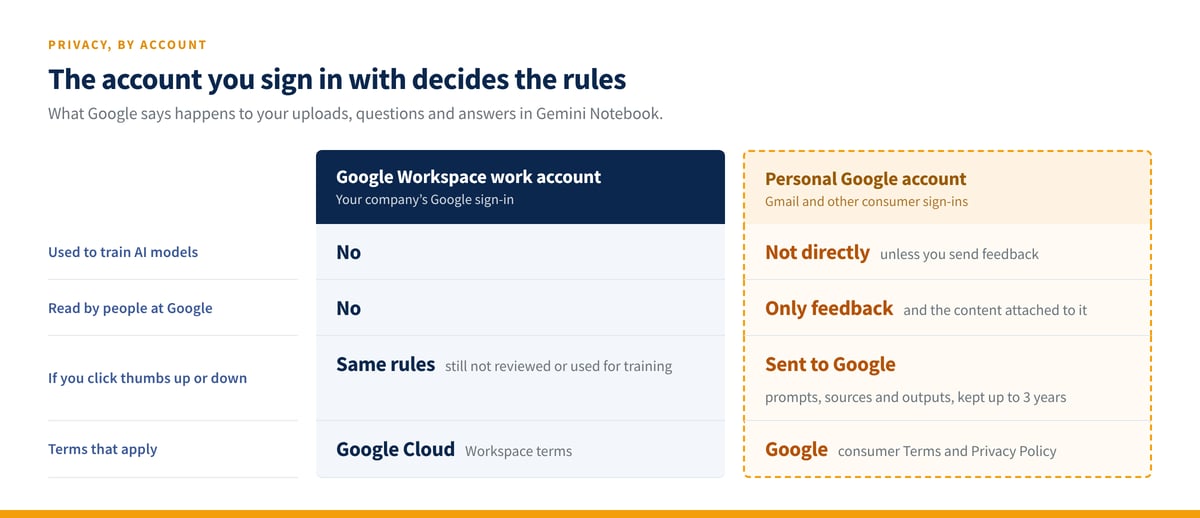
Three practical rules follow. First, put deal documents in a notebook under your company’s Google Workspace account, not a personal Gmail account. Second, don’t hit thumbs up or thumbs down on a notebook that holds confidential material if you are on a personal account, because feedback sends the related content to Google for review. Third, ask your IT or security lead whether Gemini Notebook is approved for your Workspace domain before you load anything sensitive. Workspace admins can turn it on or off for users.
Where it fits in budget season
Gemini Notebook is not a budgeting tool, and it shouldn’t be used as one. Where it earns its place is upstream of the budget, in the weeks spent gathering and defending assumptions. A 2027 budget needs several separate assumptions, for insurance, taxes, utilities, payroll and rent growth, and each one should trace back to something you can show an owner or a lender.
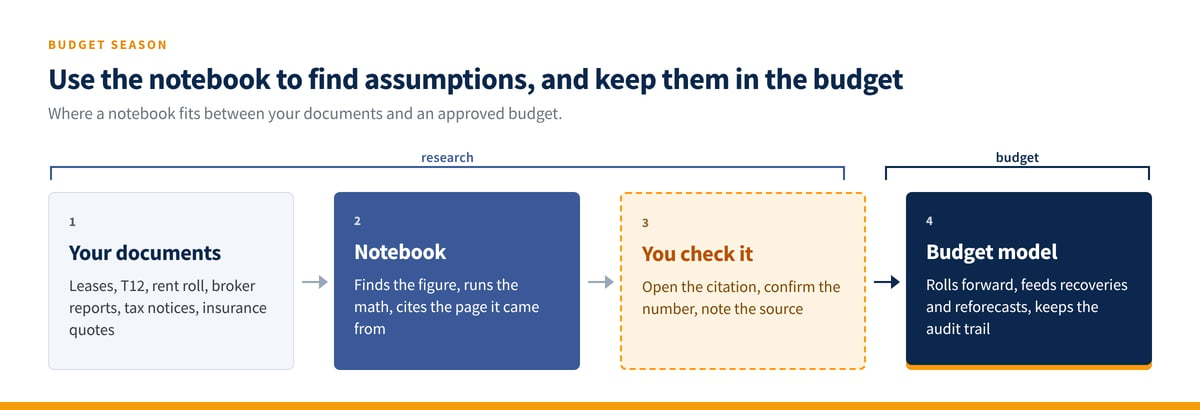
In practice: build a notebook with the leases for a property and ask which ones carry expense caps or base-year resets. Load the tax assessor’s notice and last year’s appeal file and ask what changed. Add three insurance renewal quotes and ask it to line up the coverage differences. Then take the confirmed numbers into your budget, where they roll forward, feed recoveries and reforecasts, and show who changed what. Use the notebook to look things up, and keep the numbers you settle on in the budget, where they’re tracked.
The honest limit
A notebook only knows what you put in it. If the rent roll is stale, the answer is stale, with a citation. Citations make checking fast, but they don’t make checking optional: AI tools still misread tables, drop a footnote or blend two documents that disagree. It doesn’t know your portfolio, your lender covenants or the side letter that never got scanned. And what it generates is a draft, not a record. Nothing in a notebook rolls forward into next year’s budget or ties back to your accounting system.
Used for what it is good at, it gives a CRE team back hours a week of document hunting. That is worth trying. If you want the numbers that come out of that work to land somewhere built for them, see how Kardin handles budgeting and reforecasting, or browse Kardin’s AI resources for more on using AI tools safely in CRE finance.
Budget with clarity.
Frequently asked questions
Is Gemini Notebook the same as NotebookLM?
Yes. Google renamed NotebookLM to Gemini Notebook on July 16, 2026. It is the same standalone product, and existing notebooks and sources carried over. The rename came with tighter links to the Gemini app and a new feature that lets notebooks write and run code on your sources.
Is it safe to upload an OM or rent roll to Gemini Notebook?
It depends on the account. Under a Google Workspace work account, Google says uploads, questions and responses are not reviewed by people or used to train AI models, even when you give feedback. Under a personal account, content is not used to directly train models unless you give feedback, and feedback can be human reviewed. For confidential deal material, use a Workspace account your company has approved for the tool.
Can Gemini Notebook analyze the numbers in a rent roll or T12?
Increasingly, yes. The secure cloud computer that arrived with the rename lets a notebook write and run code against uploaded files, so it can total, group and compare figures rather than only describe them. Check the output against the source file before using it, the same as you would a junior analyst’s spreadsheet.
Does Gemini Notebook replace CRE budgeting software?
No. It is a research and document tool. It can help you find and support budget assumptions, but it does not hold a budget, roll it forward, calculate recoveries or keep a history of changes. Those belong in a budgeting system that ties to your accounting data.
What does Gemini Notebook get wrong?
Mostly what any AI tool gets wrong with financial documents: complex tables, numbers split across pages, and sources that contradict each other. It answers only from what is in the notebook, so missing or outdated documents produce confident, cited, wrong answers. Click the citation before you rely on a number.
Sources
- Google, “NotebookLM is now Gemini Notebook” (Josh Woodward, July 16, 2026). The rename, usage figures, Gemini app sync, AI Mode in Search, and the secure cloud computer and its rollout.
- Gemini Notebook Help, Privacy and Terms of Use in Gemini Notebook. Training, feedback, human review and retention rules for personal and Workspace accounts; data shared with the Gemini app.
- Google Workspace, Generative AI in Google Workspace Privacy Hub. Workspace data protections for Gemini Notebook.
- Gemini Notebook Help, Add or discover new sources for your notebook. Source types and web source discovery.
Kardin Systems is not affiliated with or endorsed by Google. This article is for information only and is not an endorsement of any third-party product. Google’s features and terms change; check the linked Google pages for current details.